Setting Up Chirpy
This is a brief introduction to setting up a Github page. Trying to get the setup time to 1 hour. More to follow.
Prerequisites
Note: This is for Windows , WSL and Docker but should work for any operating system. (As a alternative you can you Github code spaces see this link)
- Git account.
- WSL-2
- Docker Desktop.
- Install Ubuntu (use the latest version) in WSL. (with git configured see Appendix A)
Check that Docker runs in your Ubuntu install.
1
docker run hello-world
Steps to follow on wiki: Do the “Getting Started”, “Customize the Favicon” and “Writing a New Post”.
Note: Under the “Getting Started” link , do only “Option 1:”. You will be using Dev Containers in Visual Studio Code, make sure to install the DevContainer Extension in Visual Studio Code.
Home · cotes2020/jekyll-theme-chirpy Wiki · GitHub
Directory tree structure of pages added and modified.
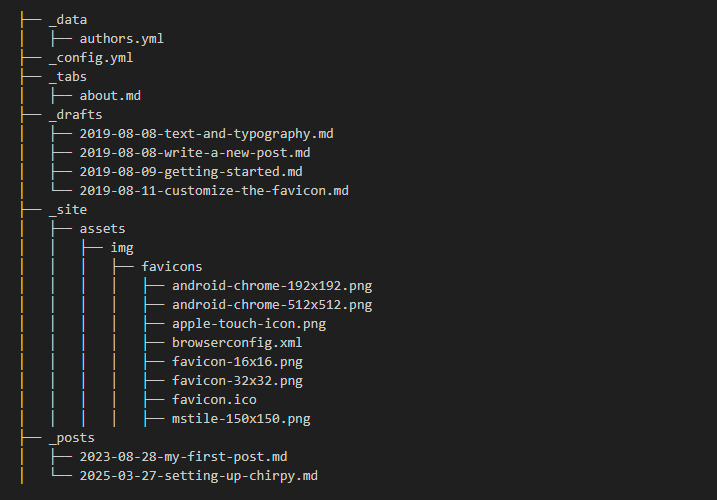 The _drafts directory and example posts is optional
Pages to modify and Add
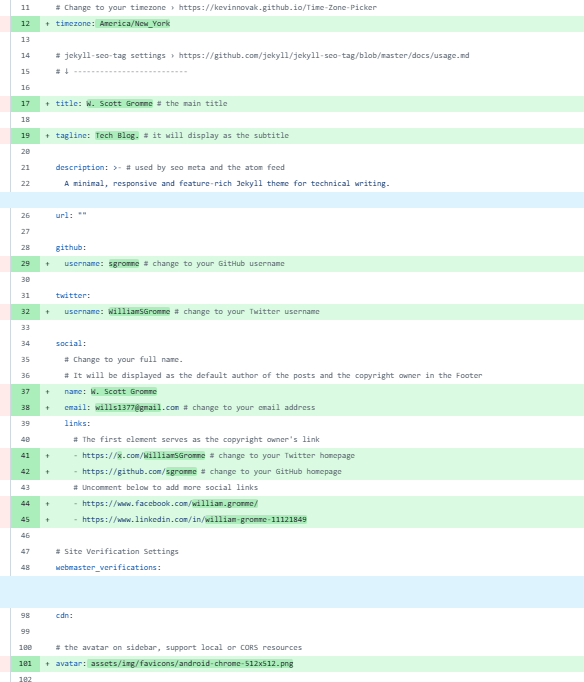 The _config.yml file edits in green
Page to modify
 The _tabs/about.md file edits in green
Pages to modify and add
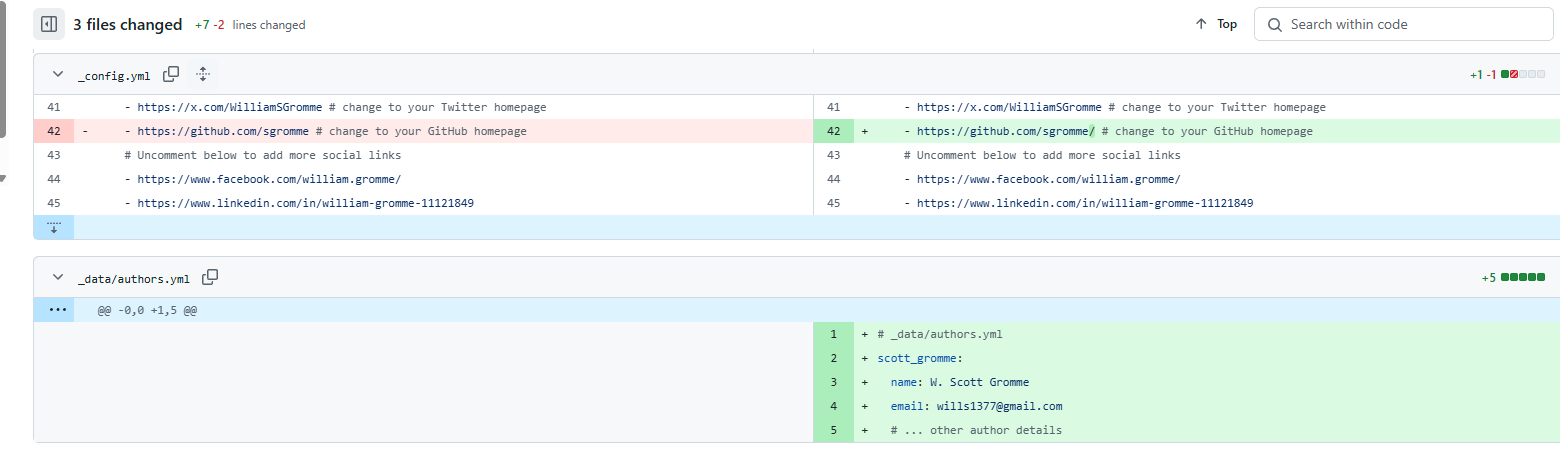 The files to be modified or added
Lessons Learned while using jekyll-theme-chirpy
- Test all page (especially _config.yml ) updates on your local web server before pushing to Github. Also make sure to test on Edge and Chrome.
- Your Github page should always be open and on the “Actions” tab on your remote repository to see if any errors have occurred after pushing changes to Github. You should also be on the Github web page to test updates and to verifiy everthing displays correctly. If a error occurs, just expand the error and see if you can troubleshoot it.
- Posts pages need to be exact - for example - only one empty line should be after a #(or multiple # header line), if a extra space is added and the post\text might not display correctly or at all (occurs in Chrome browser).
- Use the _drafts directory to keep example posts and posts that are not complete. You can then drop them in the _posts directory and test them on the local server before pushing then to Github.
- Install and use Copilot to help with using chirpy.
- Store your images under ./assets/img/posts.
Appendix
Appendix A: Git Configuration
Add git variables with the following commands (usually only on Wsl-2). If you are unsure run these commands to see if they already exist.
1
2
3
git -v
git config --global user.name
git config --global user.email
1
2
git config --global user.name "Your Name"
git config --global user.email "your.email@example.com"
Appendix B: Directory Structure
Command to print the directory structure.
1
tree
Appendix C: Starting the Jekyll Server in reload
Command to start the web server:
1
bundle exec jekyll serve --livereload